

Table Of Contents
[Kits are available](mailto:colin@elechelp.com?Subject=Buying LED FX kit&Body=Please e-mail the cost of LED FX kit by air mail to my country:****___**** and send details of how I can pay for it. My name is:____) for this project from Talking Electronics for $15.00 plus postage.
Plus you will need:
- 6pin to 5pin adapter @ $2.50
You will also need:
- Chip Programmer - PICkit2 from Modtronix (MPASM and MPLAB come with PICkit2) and it includes USB lead
- PIC12F629 Data Sheet (.pdf 4,926KB)
- Instruction Set for PIC12F629
- blank12F629.asm template
- PIC12F629.inc
See more projects using micros:
This project produces a number of effects on a set of three LEDs.
You can also produce your own sequence and store it by using the 3 buttons.
You can build the project on Matrix Board or buy a complete kit with pre-programmed chip.
You can also program the chip yourself and use this project as the beginning to: ”learning to write your own programs.”
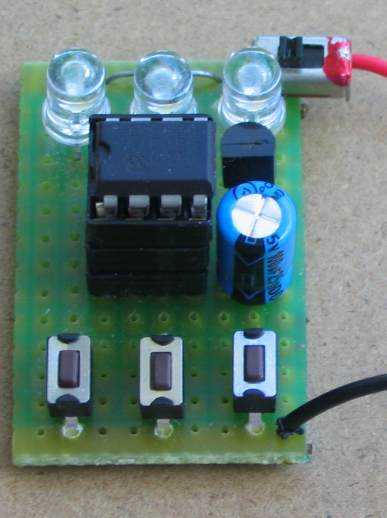
LED FX built on matrix board
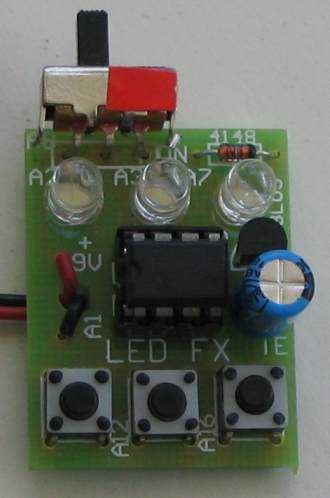
LED FX on PCB
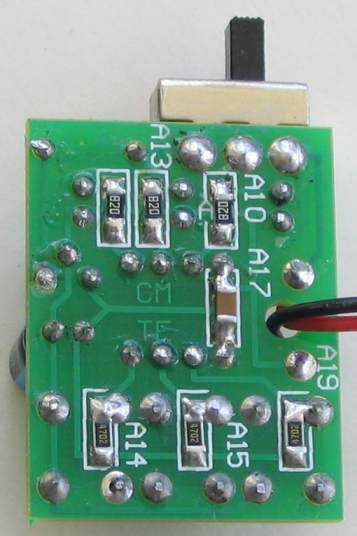
Underside of LED FX showing SM resistors
This project takes the place of a number of flashing circuits and can be set so that any of the sequences will show when the circuit is first turned on.
The main purpose of the project is to teach programming, however it also offers a challenge to constructors as it is laid out on matrix board, using surface-mount components. .
We have used SM components for convenience AND for ease-of-use. Once you start using them you will never go back to through-hole components. They are smaller, neater and make a very compact design.
They also make the project look simpler as they “disappear” under the board; or if you are developing a single-sided project, they reduce the size of the final design appreciably.
So, we have two areas of interest. Constructions and programming and it’s up to you to take it on.
The project is designed for all sorts of uses, including models such as train layouts, alarms and similar effects.
It can also be expanded to accept more LEDs and these can be placed on a separate display board.
But the real thing we want to get across, is programming.
This is another example of using a simple 8 pin chip to provide a number of features that would take many logic chips (such as counters and gates) and lots of components to duplicate.
It also highlights our method of hand-coding as an effective way to produce a program.
It is doubtful if the same effects could be produced on any of the pre-packaged microcontroller modules, using a tiny 8 pin chip.
This project uses about 400 instructions to produce the effects and it uses the EEPROM to store the sequence produced by the user (sequence 1) - and show it at turn-on.
In this respect, some of the sub-routines in the program are quite complex and suitable for the advanced programmer. However, if you are a beginner, you can read through the program and most of the sub-routines will be easy to follow as each line of code is explained. You have to start somewhere and this project offers a challenge.
Most projects with a program of this complexity are only available as a pre-programmed chip or only the hex code is available. There is usually no attempt at educating the reader in programming.
That’s the difference between our projects and all others.
We offer a learning curve.
For every hour of effort you put into reading, building and using one of our microcontroller projects, you get the experience of 100 hours of effort that has been put into the design to make it appear simple.
All you have to do is start…
INSTRUCTIONS FOR USE
- There are 12 sequences.
- The first sequence can be created by the user. It currently produces a very slow flash-rate as it has not be programmed. The other 11 sequences are pre-programmed.
- Turn project ON.
- Allow all the LEDs to flash two times then push the first button (called SwA) and hold it down and the sequence will change to the next sequence.
- Release the button and allow the sequence to cycle.
- Push SwA again and the sequence will change.
- You need to allow each sequence to cycle with the button not-pressed and then push SwA and keep it pressed until a new sequence shows. This is due to the debouncing in the program.
TO CREATE YOU OWN SEQUENCE.
- Press SwA and at the same time, turn project ON.
- Release SwA and press the switches in any order (up to 15 steps). A step or delay cannot be longer than 2 seconds as the program will “time out.” When finished, wait 3 seconds and the sequence will show on the LEDs.
- Turn project off and on. The new sequence will appear as the first sequence.
TO MAKE ANY SEQUENCE THE FIRST SEQUENCE
Any of the sequences can be saved as the first sequence, as follows:
- Turn the project ON and increment the sequences.
- To save the desired sequence, press SwB. The display will die.
- Turn project OFF then ON. The desired sequence will show at start-up.
- To delete this feature, push SwC and at the same time, turn project ON.
PROGRAMMING THE CHIP
The kit comes with a pre-programmed PIC chip but if you want to program your own chip or modify the program, the .hex file is available as well as the assembly file, so you can see how the program has been written and view the comments for each line of code.
The PIC12F629 is one of the smallest micros in the range but you will be surprised how much can be achieved with such a tiny micro.
The program contains sub-routines to produce delays, sequences on the display and both read and write EEPROM; jobs that require accurate code - including a special sequence - called a handshaking sequence that prevents the EEPROM being written due to glitches.
Even a program as simple as this is not easy to put together and to assist in this area, we have provided a whole raft of support material.
Not only do we provide a number of programs with full documentation but our approach to programming is simple.
It involves a method of “copy and paste” whereby sub-routines are taken from previously written code and copied into your program. Any modifications are made in very small steps so that each can be tested before adding more code.
This is exactly how we produce a complex project. Each step is written and tested before adding the next step.
This saves a lot of frustration as it is very easy to add a line of code that is incorrect and get an unsuspected result.
If you follow our suggestions you will buy a programmer (“burner”) called a PICkit-2 if you are using a laptop. It is the cheapest and best on the market and comes with a USB cable and 2 CD’s containing the programs needed to “burn” the chip. If you are using a desk-top and/or tower with a serial port, you can use a cheaper programmer called MultiChip Programmer from Talking Electronics. You will also need NotePad2 to write your .asm program. This can be downloaded from Talking Electronics website. You will use LED_FX.asm or LED_FX-asm.txt as a template for your program, plus a 6 pin to 5 pin connector that fits between the burner and the project. This is also available on Talking Electronics website.
As we said before, this project is for medium-to-advanced programmers as it is very compact and does not have in-circuit programming pins.
To be able to modify the chip you will need a programming socket and this can be obtained from one of our other projects that contains the 5 pins for in-circuit programming.
You can then put the chip into the other project to be programmed and modified and re-fit it into this project for execution.
PROGRAMMING LANGUAGE
There are a number of kits, programs and courses on the market that claim and suggest they teach PIC Programming.
Most of these modules and courses use a PIC microcontroller as the chip carrying out the processes, but the actual programming is done by a proprietary language invented by the designer of the course.
Although these courses are wonderful to get you into “Programming Microcontrollers” they do not use any of the terms or codes that apply to the PIC microcontroller family.
All our projects use the 33 instructions that come with the PIC Microcontroller and these are very easy to learn.
We use the full capability of the micro and our pre-programmed chip is less than the cost of doing it any other way.
In addition, anything designed via our method can be instantly transferred to a PIC die and mass produced. And we use all the input pins and all the memory of the chip. The other approaches use less than 25% of the capability of the memory and one of the pins is not available.
In fact it would be difficult to reproduce this project via any of the opposition methods. It would require a larger chip and more expense.
You can use our method or the opposition. Just be aware that the two are not interchangeable.
Ours is classified as the lowest “form” (level) of programming - commonly called machine code - invented in the early days of microprocessors - and now called mnemonic programming as each line of code is made up of letters of a set of words. The opposition uses a higher level language where one instruction can carry out an operation similar to a sub-routine.
But you have to learn the “higher level language” in order to create a program. And this requires a fair amount of skill and capability.
It sounds great and it is a good idea. But if you want to learn PIC programming, it does not assist you. It is “a step removed” from learning PIC language. The other disadvantage of the opposition is the “overhead.” The 1,000 spaces allocated for your program is filled with pre-written sub-routines. You may require only 10 of these sub-routines but ALL of them are loaded in the memory space. And they take up all the memory.
You have no room for your own program.
To get around this the opposition uses the 128 bytes in EEPROM to deliver instructions on how to apply the sub-routines. This provides about 30 powerful instructions using their language called BASIC (or a similar language).
It’s a bit like selling a diary filled with all the paragraphs you need to express yourself, and leaving a few blank pages at the back for you to write single lines such as: see page 24, paragraph 7, see page 63 paragraph 4, to create your diary entries.
It depends on how much you want to be in charge of writing a program. Using our method is like writing your own auto-biography. Using the opposition is like getting a “ghost writer.”
When using a higher level language to create a program, you have absolutely no idea how the code is generated for the micro.
In some of the developmental kits, the code is “locked away” and you are NEVER able to access it.
Everything runs smoothly until a fault appears. With our method you can see the code. With the other methods, you cannot see the code - it’s like doing key-hole surgery without the advantage of an illuminated endoscope to see what you are doing.
Everything has its place and our method of hand-assembly is only suitable for very small micros and you will eventually need to “learn a high level language.” The PIC12F629 has over 1,000 locations for code and this equates to more than 20 pages when printed, so this is about the limit to doing things by hand.
But our drive is to show how much can be done with the simplest devices on the market, at the lowest cost.
Anyone can show you high-technology at a high price but this is not where you start and this is not where you get enthusiasm.
We provide the things to get you started. That’s the difference.
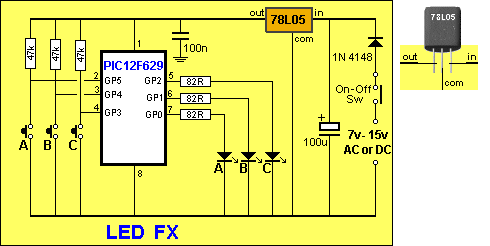
LED FX Circuit
The CIRCUIT
The circuit is very simple. It is just 3 LEDs and 3 switches. All the work is done by the micro.
We have added a 5v regulator and diode so the project can be connected to all sorts of voltages.
It will work on 6v if the regulator is removed or on 7v to 15v (AC or DC) with the regulator fitted to the board.
This makes it suitable for a 9v battery or the AC supply from a model railroad. I know you are going to say “it is inefficient using a 9v battery” but it is convenient.
THE LEDs
The LEDs supplied in the kit are ultra high-bright white LEDs. They are too bright to look at directly but can be used for all sorts of applications and effects. You can change them to suit your own application.
SURFACE-MOUNT COMPONENTS
To make the PC board as small as possible, we have used surface-mount components. Once you start using SM components, you get hooked. Through-hole components seem enormous. You will need fine tweezers to hold them in place while one end is soldered.
Always use very fine solder as you only need very little for each component and the main reason for adding extra is to take advantage of the flux to clean the connection. Always solder resistors with the value showing.
CONSTRUCTION
You can build the circuit on any type of PC board and we have used a small piece of matrix board.
The kit of components comes with all the parts you need to get the project working, including a pre-programmed chip and the matrix board.
To modify the program you will need a PICkit-2 programmer and this comes with 2 CD’s containing all the software needed for In-Circuit Programming.
You will also need a lead (comes with PICkit-2) to connect the programmer to your lap top via the USB port and an adapter we call 6pin to 5 pin Adapter to connect the PICkit-2 to your project.
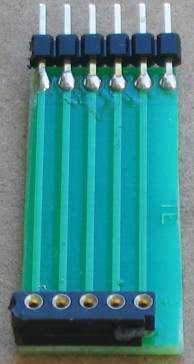
6pin to 5pin Adapter
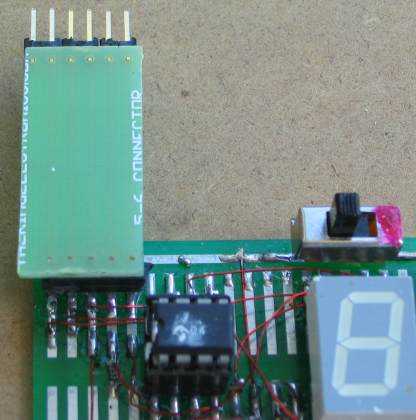
Adapter connected for In-Circuit Programming
(the chip is placed in another project for in-circuit programming or any PC board with 5 In-circuit Programming pins)
Construction is on a piece of matrix board 14 holes x 9 holes. These two drawings will be sufficient to position and solder all the components:
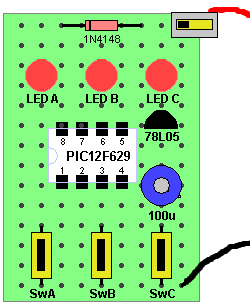
LED FX components on Matrix board
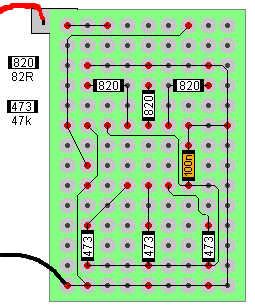
Underside of board
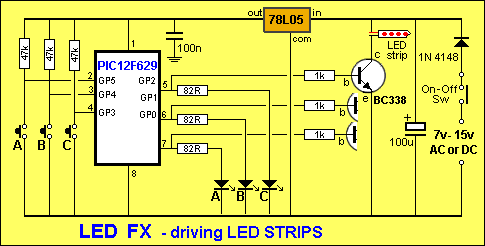
The kit comes with a printed Circuit Board and 3 x high-brightness white LEDs. If you want to drive LED strips, ask for 3 x 1k standard resistors and 3 x BC338 transistors.
Driving LED Strips
One reader wanted to use the LED Fx project to drive 3 LED strips for his son’s bike.
You will need to connect 1k resistors to pins 5, 6 and 7 and use 3 x BC338 transistors as shown in the following circuit:
The PROGRAM
The program does a bit of detecting when turned on. It detects to see if a bit has been set in EEPROM to tell the micro to go to a required sequence or start with sequence 1.
It also detects if switch A or C has been pressed at the instant the project is turned on so that the micro is directed to the sub-routine where the user-sequence can be entered or if the EEPROM bit is to be cancelled.
All this gets done in the SetUp routine and then the micro goes to Main.
In Main, the program increments a “jump” file and calls a table where it finds a directive to go to a particular sub-routine.
The sub-routine is executed and the micro goes back to Main where it looks for a release of SwA. This forms part of a key debounce as the key must be fully debounced as it is advancing the micro through the sequences.
To provide a totally reliable debounce, the key is detected as not being pushed for the duration of a whole cycle of a sequence and a separate loop is then executed where the key can be detected as being pushed, to advance the program to the next sequence.
To create your own sequence as sequence1, the project is turned off and SwA pressed while turning the project ON.
This sends the micro to a sub-routine called Attract.
As soon as SwA is released, the program starts to time the duration when a switch is not pressed and it “times-out” after 2.5 seconds.
The program also times the duration when a LED is illuminated. It also accepts 2 or 3 LEDs illuminated at the same time. These are all clever instructions that need to be looked at to see how they operate.
Up to 15 steps can be entered and each step occupies three bytes. The first value identifies the illuminated LEDs, the second byte identifies the ON duration (in increments of 5mS) and the third byte identifies the OFF time.
These 45 bytes are contained in files 30h to 5Fh.
When a switch is not pressed for 2.5 seconds, the program “times out” and sends the values to the EEPROM. It then shows the sequence on the LEDs.
If the project is turned off and on again, this sequence will be displayed as sequence1.
To replace the sequence with something else, simply repeat the steps above.
If you want one of the pre-programmed sequences to appear each time the project is turned on, simply advance through the sequences by pressing SwA and when the desired sequence is playing, push SwB.
This will record your choice. Turn the project OFF then ON again and the chosen sequence will be displayed.
To remove this feature, press SwC when the project is off and at the same time, turn the project ON.
All these feature have been added to the program, one at a time, and it is important to add them in the correct order. For instance, you can only add a removal feature after the initial feature has been produced. Reading and writing to the EEPROM is a most complex operation and the instructions must be laid out as shown in the program, as they include a hand-shaking sequence. When you need this code it is copied and pasted in its entirety, to prevent a mistake.
Nearly every instruction has a comment to explain not only what it does, but why it was chosen.
If you think you can start programming without reading programs from other developers, you are wasting your time.
No individual can work how to do many of the tasks via the simplest set of instructions and you will find some programmers have used complex code to do the simplest task.
That’s why you have to pick out the “wheat from the chaff” and remember a good routine, while discarding the over-complex sets of code.
This brings up an important point.
Don’t expect to be an A1 programmer in a week. It takes time to absorb the skills of programming and it is really only understood by a microscopic percentage of electronics enthusiasts. If you take it up and understand it, you are one of the microscopic few.
It is a world that, once you are in, will open up a whole new field of ideas and development.
It’s like taking up a new spoken language and, in fact, a program reads like a book, so the analogy is very close.
There are some very “clever” instructions such as XOR where you can compare two files by using the XOR function and determine if they are the same. And very powerful instructions such as djnz that decrements a file and if it is zero, the micro jumps over the next instruction.
Other clever instructions transfer the contents of a file to another via the “carry.”
You cannot be expected to know these “tricks” unless you study programming. That’s why we are here.
Here are the files you will need:
 ;*******************************
;;**LED FX.asm**
;  11-3-2010
;*******************************

    list    p=12F629
    radix   dec
    include "p12f629.inc"

    errorlevel  -302    ; Don't complain about BANK 1 Registers during assembly

    __CONFIG    _MCLRE_OFF & _CP_OFF
    & _WDT_OFF & _INTRC_OSC_NOCLKOUT  ;Internal osc.

;_MCLRE_OFF  - master clear must be off for gp3 to work as input pin

;****************************************************************
; variables - names and files
;****************************************************************

temp1           equ 20h ;
temp2           equ 21h ;
temp3           equ 22h ;
temp4           equ 23h ;
jump            equ 24h ;jump value for table1
fadeUp        equ 25h
fadeDwn       equ 26h
sequences       equ 27h
sw_duration equ 28h
testing       equ 29h

;****************************************************************
;Equates
;****************************************************************
status  equ 0x03
rp1     equ 0x06
rp0     equ 0x05
GPIO      equ   0x05


status      equ 03h
option_reg  equ     81h


    ; bits on GPIO

pin7    equ 0   ;GP0  LED C
pin6    equ 1   ;GP1  LED B
pin5    equ 2   ;GP2  LED A
pin4    equ 3   ;GP3  Sw A
pin3    equ 4   ;GP4  Sw B
pin2    equ 5   ;GP5  Sw C


        ;bits

rp0 equ 5   ;bit 5 of the status register


;****************************************************************
;Beginning of program
;****************************************************************
      org   0x00
      nop
      nop
      nop
      nop
      nop
SetUp   bsf   status, rp0   ;Bank 1
      movlw b'11111000'   ;Set TRIS GP0,1,2 out  GP3,4,5 input
        movwf   TRISIO        ;
      bcf     status, rp0       ;bank 0
      movlw 07h             ;turn off Comparator ports
      movwf CMCON           ;must be placed in bank 0
      clrf  GPIO            ;Clear GPIO of junk
      call  _memory
      btfss gpio,5          ;SwA to: "record new sequence"
      goto  record
      btfsc gpio,3          ;SwC removes attract sequence
      goto  $+.10
      movlw 0FFh
      bsf     status,rp0        ;select bank1
      movwf EEDATA
      bcf     status,rp0        ;select bank0
      movlw .101
      bsf     status,rp0        ;select bank1
      movwf EEADR
      bcf     status,rp0        ;select bank0
      call  write
      movlw .101
      bsf     status,rp0
      movwf EEADR
      bsf     EECON1,0      ;starts EEPROM read operation. Result in EEDATA movf    EEDATA,w    ;move read data  into w
      bcf     status,rp0
      xorlw .8              ;look for 8 - for Attract mode
      btfsc 03,2
      goto  Attract_Seq   ;selected sequence will appear first
      goto  Main

;****************************************************************
;* Tables           *
;****************************************************************

table1  addwf   PCL,F           ;02h,1  add W to program counter
        retlw   .10     ;
        retlw   .50
                retlw   .30     ;
        retlw   .50
        retlw   .100     ;
        retlw   .40       ;program starts at bottom of table
        retlw   .10     ;
        retlw   .50
                retlw   .30     ;
        retlw   .50
        retlw   .60     ;
        retlw   .10     ;
        retlw   .50
                retlw   .10     ;
        retlw   .50
        retlw   .100     ;
        retlw   .20     ;
        retlw   .50
                retlw   .30     ;
        retlw   .50
        retlw   .70
        retlw   .60     ;
        retlw   .100     ;
        retlw   .50
                retlw   .100     ;
        retlw   .50
        retlw   .100     ;
        retlw   .70     ;
        retlw   .50
                retlw   .30     ;
        retlw   .50
        retlw   .70     ;

table2  addwf PCL,F           ;02h,1  add W to program counter
        goto    seq1
        goto    seq2
        goto    seq3
        goto    seq4
        goto    seq5
        goto    seq6
        goto    seq7
        goto    seq8
        goto    seq9
        goto    seq10
        goto    seq11
        goto    seq12

;****************************************************************
;* Delays           *
;****************************************************************

_xuS    movwf     temp2
_uS   movlw   .10
      movwf   temp1
      decfsz    temp1,f
      goto    $-1
      decfsz    temp2,f
      goto    _uS
      retlw     00

_ZuS    movwf     temp2
      goto    $+2
      goto    $+2
      decfsz    temp2,f
      goto    $-3
      retlw     00


_xmS    movwf     temp2
_x    nop
      decfsz    temp1,f
      goto    _x
      decfsz    temp2,f
      goto    _x
      retlw     00

    ;5mS delay for increments in timing for "New Sequence"

_5mS    movlw     05h
        movwf     temp2
_5    nop
      decfsz    temp1,f
      goto    _5
      decfsz    temp2,f
      goto    _5
      retlw     00


_10mS   movlw     0Ah
        movwf     temp2
_10   nop
      decfsz    temp1,f
      goto    _10
      decfsz    temp2,f
      goto    _10
      retlw     00


_50mS   movlw     .50
        movwf     temp2
_50   nop
      decfsz    temp1,f
      goto    _50
      decfsz    temp2,f
      goto    _50
      retlw     00

_100mS  movlw     .100
          movwf   temp2
_100      nop
        decfsz  temp1,f
        goto      _100
        decfsz  temp2,f
        goto      _100
        retlw   00


_150mS  movlw     .150
          movwf   temp2
_150      nop
        decfsz  temp1,f
        goto      _150
        decfsz  temp2,f
        goto      _150
        retlw   00


;****************************************************************
;* Sub Routines             *
;****************************************************************

_memory

        movlw   .48
        movwf   temp1
        movlw   2Fh
        movwf   fsr
        incf    fsr,f
        movlw   0FFh
        movwf   indf
        decfsz  temp1,f
        goto    $-4
        retlw   00

       ;SwB puts current sequence into EEPROM for turn on.
       ;and puts "marker" in location 101

Attract
        movf    sequences,w ;put sequence number into w
        bsf   status,rp0    ;select bank1
        movwf   EEDATA
        bcf   status,rp0    ;select bank0
        movlw   .100
        bsf   status,rp0    ;select bank1
        movwf   EEADR
        bcf   status,rp0    ;select bank0
        call    write
        movlw   .8
        bsf   status,rp0    ;select bank1
        movwf   EEDATA
        incf    EEADR,1
        bcf   status,rp0    ;select bank0
        call    write
        nop
        goto    $-1         ;Project must now be turned off


    ;Seq selected as Attract will be displayed when project turned on

Attract_Seq
        movlw   .100
        bsf   status,rp0
        movwf   EEADR
        bsf   EECON1,0    ;starts EEPROM read operation. Result in EEDATA movf  EEDATA,w    ;move read data into w
        bcf   status,rp0
        movwf   temp4
        movf    temp4,w
        call    table2
        goto    $-2


    ;record new sequence - looks for "no switch pressed" for 1.25 seconds to exit
    ;uses files 30h to 5Fh  (48 files)
    ;three files per "step"   1st file = LEDs,  2nd = Off time, 3rd = on time
    ;15 steps allowed - look for 5Dh

record  btfss   gpio,5  ;wait for release of button A
        goto    $-1
        movlw   30h
        movwf   fsr ;start storage at file 30h

    ;look at keys being pressed - identifies 2 or 3 keys pressed together

_r1   clrf  sw_duration
_r1a    call    _5mS
      incfsz    sw_duration,1   ;5mS x 256 = 1.25seconds
      goto  $+2
      goto  Store       ;time out! store files 30h to 5Fh in EEPROM
      btfss gpio,5      ;see if one or more Sw is pressed
      goto  $+5
      btfss gpio,4
      goto  $+3
      btfsc gpio,3
      goto  _r1a        ;no sw pressed create 2.5 sec timing
                ;1,2,or 3 sw pressed

      call  _10mS       ;delay to detect 2 or 3 switches
      incfsz    sw_duration,1
      goto  $+2
      goto  Main
      btfsc gpio,5      ;SwA
      goto  $+2
      bsf     gpio,0        ;turn on LED A
      btfsc gpio,4      ;SwB
      goto  $+2
      bsf     gpio,1        ;turn on LED B
      btfsc gpio,3      ;SwC
      goto  $+2         ;
      bsf     gpio,2        ;turn on LED C
                ;LEDs have been illuminated
      movf  gpio,w
      movwf indf        ;w moved to fsr's file (30h+)
      incf  fsr,f
      movf  sw_duration,w   ;off time!!
      movwf indf        ;w moved to fsr's file (30h+)
      incf  fsr,f
      clrf  sw_duration
_r2   call  _5mS
      incfsz    sw_duration,1
      goto  $+2
      goto  record      ;time out! keys pressed too long. Start again
      btfss gpio,5
      goto  _r2     ;sw pressed
      btfss gpio,4
      goto  _r2     ;sw pressed
      btfss gpio,3
      goto  _r2     ;sw pressed
                ;file empty. Put duration into file
      movf  sw_duration,w   ;on time
      movwf indf            ;w moved to fsr's file (30h+)
      incf  fsr,f
      movlw 5Dh
      xorwf fsr,w
      btfss 03,2
      goto  $+2
      goto  Store   ;stop at 15 steps. store files 30h to 5Fh in EEPROM
      clrf  gpio
      goto  _r1

    ;sequences:

    ;seq1 Self-Programmed sequence
    ;1St file:LEDs  2nd file:OFF time  3rd file:On time

seq1    bsf   status,rp0
      clrf  EEADR
      bcf     status,rp0
      bsf     status,rp0
      bsf     EECON1,0  ;starts EEPROM read operation. Result in EEDATA
      movf  EEDATA,w    ;move read data into w
      bcf     status,rp0
      movwf gpio
      bsf     status,rp0
      incf  EEADR,1
      bsf     EECON1,0  ;
      movf  EEDATA,w    ;move read data into w
      bcf     status,rp0
      movwf temp4       ;this is OFF time. Store it
      bsf     status,rp0
      incf  EEADR,1
      bsf     EECON1,0  ;
      movf  EEDATA,w    ;move read data into w
      bcf     status,rp0
      movwf sw_duration     ;this is ON time
      call  _5mS
      decfsz    sw_duration,1
      goto  $-2
      clrf  gpio
      call  _5mS
      decfsz    temp4,f ;create OFF duration
      goto  $-2
      bsf     status,rp0
      incf  EEADR,1
      bsf     EECON1,0  ;
      movf  EEDATA,w    ;move read data into w
      bcf     status,rp0
      xorlw 0FFh    ;look for 0FFh - end of routine
      btfss 03,2
      goto  $-31
      retlw 00


    ;seq2 chase right - very fast


seq2    bsf   gpio,0
      call  _100mS
      bcf     gpio,0
      bsf     gpio,1
      call  _100mS
      bcf     gpio,1
      bsf     gpio,2
      call  _100mS
      bcf     gpio,2
      call  _100mS
      clrf  gpio
      retlw 00

    ;seq3 chase right


seq3    bsf   gpio,0
      call  _150mS
      bcf     gpio,0
      bsf     gpio,1
      call  _150mS
      bcf     gpio,1
      bsf     gpio,2
      call  _150mS
      bcf     gpio,2
      call  _150mS
      clrf  gpio
      retlw 00

    ;seq4 chase right with off-delay at end


seq4    bsf   gpio,0
      call  _150mS
      bcf     gpio,0
      bsf     gpio,1
      call  _150mS
      bcf     gpio,1
      bsf     gpio,2
      call  _150mS
      bcf     gpio,2
      call  _150mS
      retlw 00

    ;seq5 left right left right

seq5    bsf   gpio,0
      call  _150mS
      bcf     gpio,0
      bsf     gpio,2
      call  _150mS
      bcf     gpio,2
      retlw 00


    ;seq6 middle on middle off

seq6    bsf   gpio,1
      call  _150mS
      bcf     gpio,1
      call  _150mS
      clrf  gpio
      retlw 00


    ;seq7 All on all off

seq7    clrf    gpio
      call  _150mS
      decf  gpio,f
      call  _150mS
      clrf  gpio
      retlw 00


seq8    ;seq8 middle on then sides on

      bsf     gpio,1
      call  _150mS
      bcf     gpio,1
      bsf     gpio,0
      bsf     gpio,2
      call  _150mS
      clrf  gpio
      retlw 00

    ;seq9 police flasher 3 times left 3 times right

seq9    bsf   gpio,0
      call  _50mS
      bcf     gpio,0
      call  _50mS
      bsf     gpio,0
      call  _50mS
      bcf     gpio,0
      call  _50mS
      bsf     gpio,0
      call  _50mS
      bcf     gpio,0
      call  _50mS
      bsf     gpio,2
      call  _50mS
      bcf     gpio,2
      call  _50mS
      bsf     gpio,2
      call  _50mS
      bcf     gpio,2
      call  _50mS
      bsf     gpio,2
      call  _50mS
      bcf     gpio,2
      clrf  gpio
      call  _50mS
      retlw 00

    ;seq10 random flicker

seq10   movlw   .32 ;start at bottom of table
      movwf jump
      bsf     gpio,1
      movf  jump,w  ;put table jump value into w
      call  table1
      call  _xmS
      bcf     gpio,1
      decfsz    jump,f
      goto  $+2
      retlw 00  ;top of table found
      movf  jump,w  ;put table jump value into w
      call  table1
      call  _xmS
      goto  $-11


    ;seq11 slow fade up down

seq11   clrf    fadeUp      ;
      clrf  fadeDwn
      incf  fadeUp,f    ;to create 1 (delay routine does not like 00)
      bsf     gpio,1
      movf  fadeUp,w
      call  _xuS
      bcf     gpio,1
      movf  fadeDwn,w
      call  _xuS
      decfsz    fadeDwn,f   ;
      goto  $-8
      incf  fadeDwn,f       ;to produce 1
      bsf     gpio,1
      movf  fadeUp,w
      call  _xuS
      bcf     gpio,1
      movf  fadeDwn,w
      call  _xuS
      decf  fadeUp,f
      incfsz    fadeDwn,f
      goto  $-8
      clrf  gpio
      retlw 00


    ;seq12 fast fade up down

seq12   clrf    fadeUp
      clrf  fadeDwn
      incf  fadeUp,f    ;to create 1 (delay routine does not like 00)
      bsf     gpio,1
      movf  fadeUp,w
      call  _ZuS
      bcf     gpio,1
      movf  fadeDwn,w
      call  _ZuS
      decfsz    fadeDwn,f   ;
      goto  $-8
      incf  fadeDwn,f       ;to produce 1
      bsf     gpio,1
      movf  fadeUp,w
      call  _ZuS
      bcf     gpio,1
      movf  fadeDwn,w
      call  _ZuS
      decf  fadeUp,f
      incfsz    fadeDwn,f
      goto  $-8
      clrf  gpio
      retlw 00


    ;Store Store the 15 steps in EEPROM

Store   bsf   status,rp0    ;select bank1
      clrf  eeadr
      bcf     status,rp0    ;select bank0
      movlw .48
      movwf temp1
      movlw 2Fh
      movwf fsr
      incf  fsr,f   ;fsr starts at file 30h
      movf  indf,w  ;retreive data in file 30h
      bsf     status,rp0    ;select bank1
      movwf eedata      ;
      bcf     status,rp0    ;select bank0
      call  write
      bsf     status,rp0    ;select bank1
      incf  eeadr,1
      bcf     status,rp0    ;select bank0
      decfsz    temp1,f
      goto  $-10
      goto  Main


write   bsf   status,rp0        ;select bank1
      bsf     eecon1,wren   ;enable write
      movlw 55h         ;unlock codes
      movwf eecon2
      movlw 0aah
      movwf eecon2
      bsf     eecon1,wr     ;write begins
      bcf     status,rp0        ;select bank0
writeA  btfss   pir1,eeif       ;wait for write to complete
      goto  writeA
      bcf     pir1,eeif
      bsf     status,rp0        ;select bank1
      bcf     eecon1,wren   ;disable other writes
      bcf     status,rp0        ;select bank0
      retlw 00


;****************************************************************
;* Main                     *
;****************************************************************

Main    clrf    sequences
      movf  sequences,w
      call  table2
      btfss gpio,5      ;Is swA still pressed?
      goto  $-3         ;SwA still pressed
      movf  sequences,w ;SwA released
      call  table2
      btfss gpio,4      ;SwB puts current sequence at turn-on
      goto  Attract
      btfsc gpio,5
      goto  $-5         ;SwA not pressed
      incf  sequences,f
      movlw .12
      xorwf sequences,w
      btfss 03,2
      goto  $-12
      goto  Main

;****************************************************************
;*EEPROM                    *
;****************************************************************

    org 2100h


    END
GOING FURTHER
We have not produced all the possible sequences and you can add more by simply creating a new sub-routine.
You need to add it to the table and make sure you end with retlw 00 to send the micro back to Main.
We have provided all the hardware and software for you to do this. Now it’s now up to you.
LED FX - Parts Lis
Cost: au$15.00 plus postage[Kits are available**](mailto:colin@elechelp.com?Subject=Buying LED FX kit&Body=Please e-mail the cost LED FX kit by air mail to my country:****___**** and send details of how I can pay for it. My name is:____)
3 - 82R (820) SM resistors
3 - 47k (473) SM resistors
1 - 100n SM capacitor
1 - 100u electrolytic
1 - SPDT mini slide switch
1 - 1N4148 diode
1 - LM78L05 voltage regulator
1 - PIC12F629 chip (with LED_FX routine)
1 - 8 pin IC socket
3 - super bright white LEDs
3 - mini tactile switches
1 - 9v battery snap
20cm very fine solder
1 - LED FX PC board and ask for 3 x 1k normal resistors and 3 x BC338 if you are driving LED strips


Quick Links
Legal Stuff
Social Media